Tasukiba — AI Ops Secretary (Service Ended)
Turn time spent searching into time spent creating.
Tasukiba was an AI secretary for teams: semantic search surfaced past assets. The service has ended; source code stays public on GitHub as a portfolio piece.
The server has been shut down and this service has ended. The source code remains public on GitHub as a portfolio piece.
Note: this service has ended. The server has been shut down, so sign-up and login are no longer available. The source code remains public in the GitHub repository as a portfolio piece. What follows is a record of the product and its policies while live.
Turn time spent searching into time spent creating
Tasukiba is an AI operations secretary that helps you manage your work data. It surfaces past assets at exactly the right moment, cutting the time you spend hunting for documents so you can focus on work that actually creates value.
(This service has ended and sign-up is no longer available. The description below reflects the product as it was while live.)
See what Tasukiba does — on screen, first
“Past assets surfaced at the right moment” sounds abstract. Here is the core experience in a single screen.
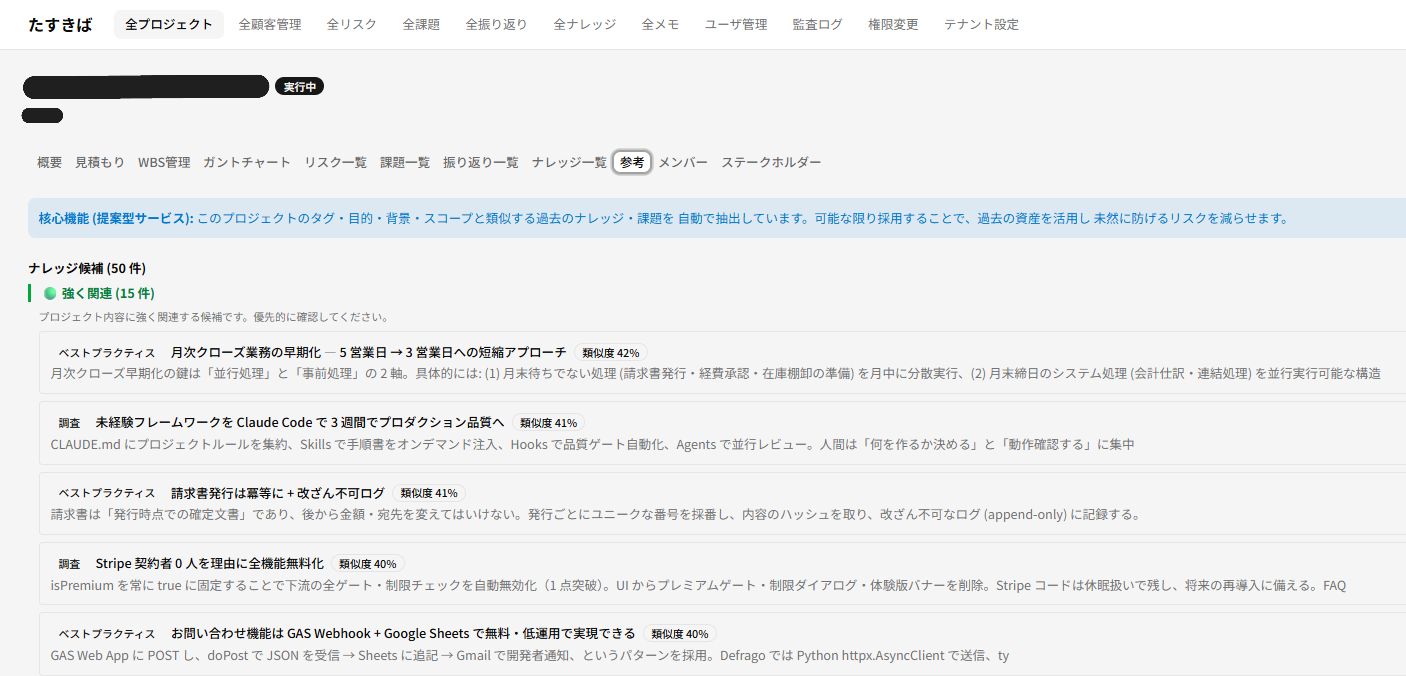
Open a project, and knowledge and issues strongly related to its tags, purpose, and scope are listed automatically with similarity scores. You don’t even need to “search.”
That knowledge accumulates across every project you run.
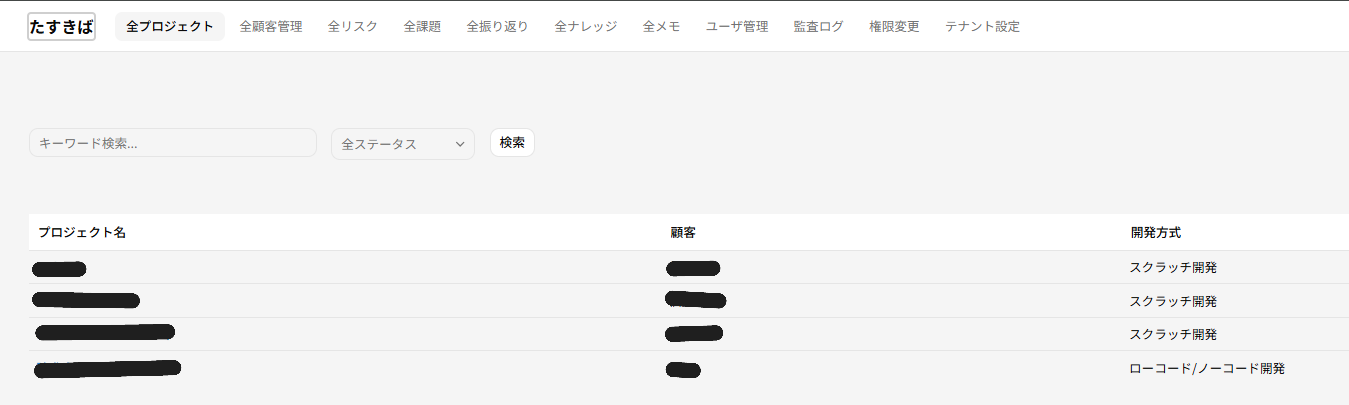
Every project in one screen. Names, customers, and delivery styles stay visible at a glance, and the experience you build up here comes back as suggestions on your next engagement.
💬 Pull past assets in natural language — Chat semantic search
Proactive suggestions arrive the moment you open a project, but there are also moments when you need to surface a past case mid-meeting or recall that one judgment rationale right now.
Tasukiba provides natural-language semantic search via a 💬 floating button that is always visible at the bottom-right of every screen.
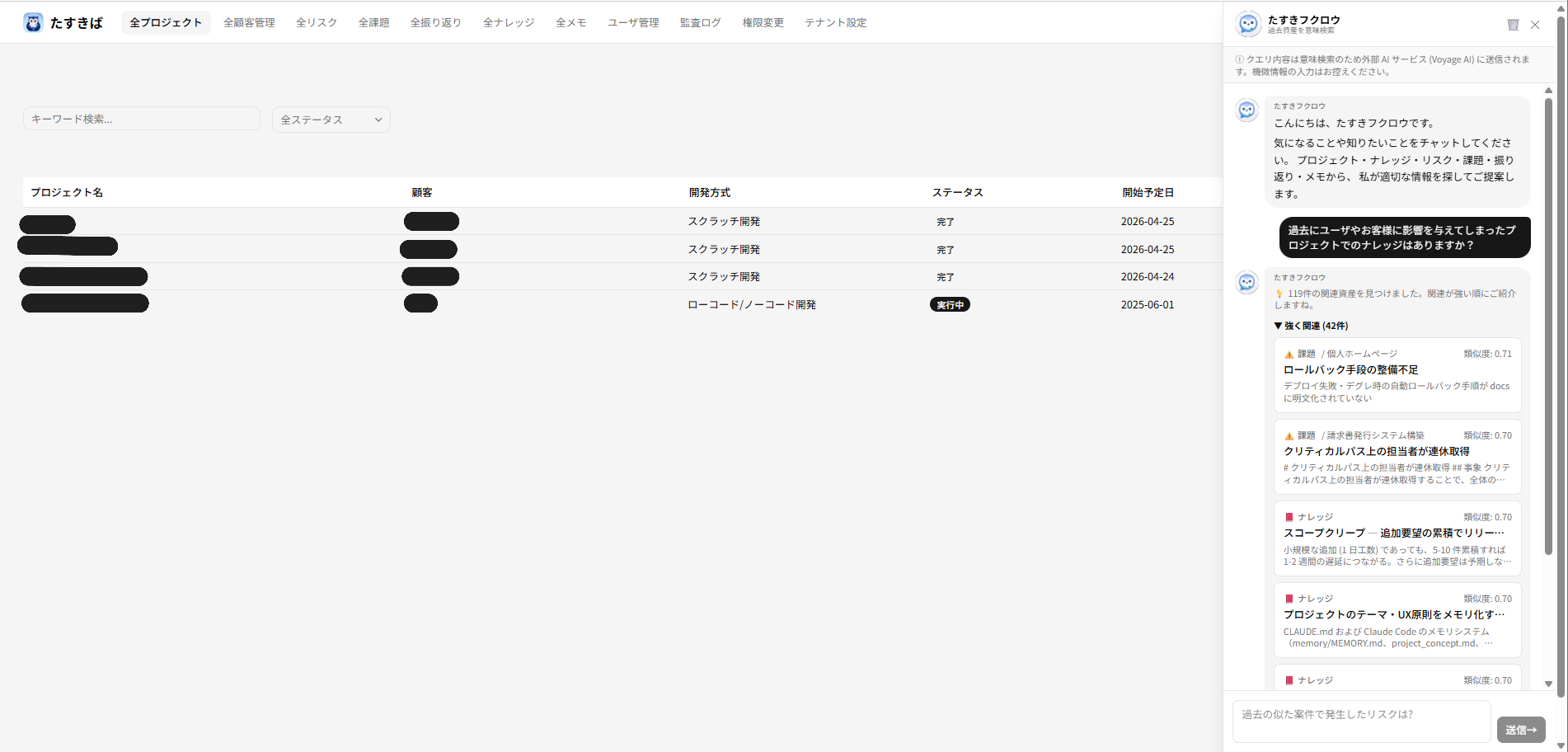
Just type a natural-language question into the 💬 button at the bottom-right of every screen. Tasukiba lines up semantically close matches from five asset types — projects, knowledge, risks/issues, retrospectives, and memos — in 0.3–0.5 seconds, grouped into Strongly related / Moderately related / Weakly related.
| Full-text search (typical tools) | Chat semantic search (Tasukiba) | |
|---|---|---|
| Input | Keywords | Natural language (with work context) |
| Result count | 100+ hits, scroll everything | Top few are enough |
| Wording drift | ”workload” and “schedule slip” treated separately | Linked by meaning — both surface |
| Cross-type | Search one asset type at a time | Five asset types in one shot |
Instead of “eyeball 100 results,” you reach “the top few are enough to decide.” Two complementary modes — “it reaches you” and “you ask for it” — structurally change how knowledge gets surfaced.
Do any of these sound familiar?
For everyone running projects — whether solo or as a team — do these moments ring a bell?
”Nobody remembers what we raised in the retrospective.”
The improvements you carefully captured don’t get applied on the next project. After three months, who suggested what is already fuzzy, and the same problems return — your learning never compounds.
”Wait, this happened on the last project too.”
Risks and issues that came up in similar past projects get ignored at the next kickoff. The time spent firefighting recurring trouble adds up to dozens of hours per project.
”When the experienced member left, the know-how went with them.”
Judgment patterns and handling techniques that lived in one person’s head disappear with attrition or reassignment. Years of knowledge can vanish with a single departure. Even solo, your own know-how from six months ago can be just as hard to recover.
— If any of this resonates, please read on.
"Doesn't using some tool already solve this?"
Plenty of project management and knowledge management tools exist. The reason they don’t actually solve the problems above is three structural limits.
1. Existing tools assume “you will go look.”
Even if every past document is stored, the information only appears the moment you decide to search for it. If you don’t think of it, it might as well not exist — existing tools have no mechanism to proactively notify a passive user.
2. Full-text search doesn’t actually narrow anything down.
When you do search, full-text search returns every record that contains the keyword. Eyeballing 100 or 500 results is not realistic.
3. Tacit knowledge vanishes without a structuring mechanism.
A veteran’s “in cases like this, do this” lives as a mental pattern. Capturing it after the fact requires structured writing, but most tools don’t help you do that.
In short, existing tools fail because they are built on the assumption that the human does all the work proactively. Only when you switch to “the tool notices for you” does the structural problem actually get solved.
Where Tasukiba sits against existing tool categories
| Category | Strength | Structural limit |
|---|---|---|
| Task management (ticket / board) | Visualizes tasks and progress | Knowledge lives in another tool. Reasoning isn’t preserved |
| Knowledge / wiki | Free-form notes, full-text search | Passive: nothing surfaces unless you go look |
| Meeting notes / chat | Real-time conversation | Not structured. Buried in time-ordered streams |
| Tasukiba | Project operations and knowledge structured in one place, semantic search + proactive suggestions | Direct integrations with Backlog / Notion etc. not yet available (CSV import is partially supported) |
How Tasukiba addresses each one
Solution 1: The system proactively surfaces what you need
Tasukiba is designed so even if you’re passive, the system shows you the relevant information for the current situation.
When you open a project, when you log a risk, when you open a retrospective — for each moment, Tasukiba automatically picks up past assets that might be useful right now (exactly the suggestions screen above).
“If you don’t notice it, it doesn’t exist” becomes “It reaches you even if you don’t notice.”
Solution 2: Semantic search gets you to the one record you actually need
Rather than keyword matching, we use semantic search that ranks by meaning proximity. Even with rewording or different phrasing, you can reach genuinely close information.
Instead of “eyeball 100 results,” you reach “a handful of the closest matches is enough.”
For the moments when you want to actively search: A 💬 floating button is always shown at the bottom-right of every screen. Type a natural-language query like “give me past cases where scope creep led to schedule overrun” and Tasukiba semantically searches five asset types simultaneously — projects, knowledge, risks/issues, retrospectives, and memos. The top few relevant matches are returned in seconds (Chat Semantic Search).
Solution 3: A way to keep experience as structure
For each frequent element of project operations — risks / issues / retrospectives / knowledge — we provide structured record types. You can capture experience in a form that is searchable, referenceable, and reusable later while keeping the writer’s burden low.
Key features
| Feature | What changes |
|---|---|
| Proactive suggestions | Even without searching, the information you need reaches you |
| Semantic search | Different wording still gets you to genuinely close information |
| Chat semantic search | A 💬 floating button on every screen — type a natural-language question and surface the top relevant assets across five types in seconds |
| Structured records | Risks, issues, retrospectives, and knowledge are saved in a form you can actually reuse |
| Simple UI | Same role, same position, same color, same label across screens. Intuitive without studying |
| User-led control | Cancellation, plan change, and export are done by you, without any back-and-forth with the operator |
Feature catalogue (everything a project needs, in one place)
| Feature | Summary |
|---|---|
| Project management | State transitions from planning through retrospective in one place |
| Estimation | Estimates informed by past knowledge and actuals |
| WBS / Task management | Hierarchical tasks with owners, progress, and actuals |
| Gantt chart | Timeline view of schedule, progress, delays, milestones |
| Risk / Issue management | Filing, state transitions, and CSV export |
| Knowledge management | Knowledge entries with full-text and semantic search, plus visibility control |
| Chat semantic search | Floating 💬 button on every screen. Natural-language queries semantically search projects, knowledge, risks/issues, retrospectives, and memos in one shot, returning the top few matches |
| Retrospective | Wrap-ups, comments, and promotion into knowledge after project completion |
| My Tasks | Personal task list with quick progress updates |
| Comments / mentions | Conversation captured against each entity |
| CSV import / export | Bring data in from Excel / spreadsheets; take it out anytime |
”Structured records,” in pictures — WBS and Gantt
Sample screens showing how past assets are stored in a form you can actually reuse later.
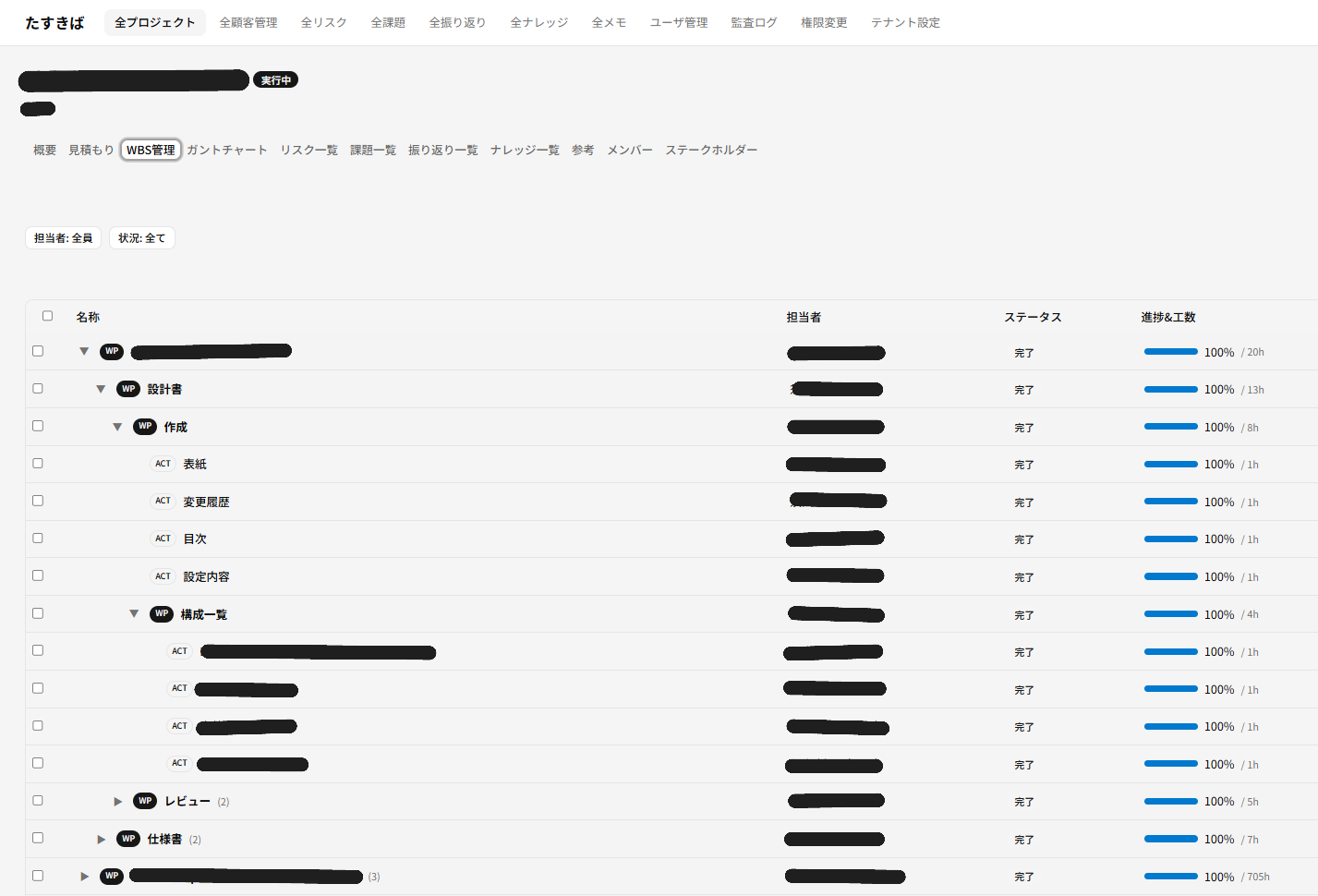
WBS: Hierarchical tasks with owners, progress, effort, planned periods, and actuals — all in one view. Each task can become knowledge later.
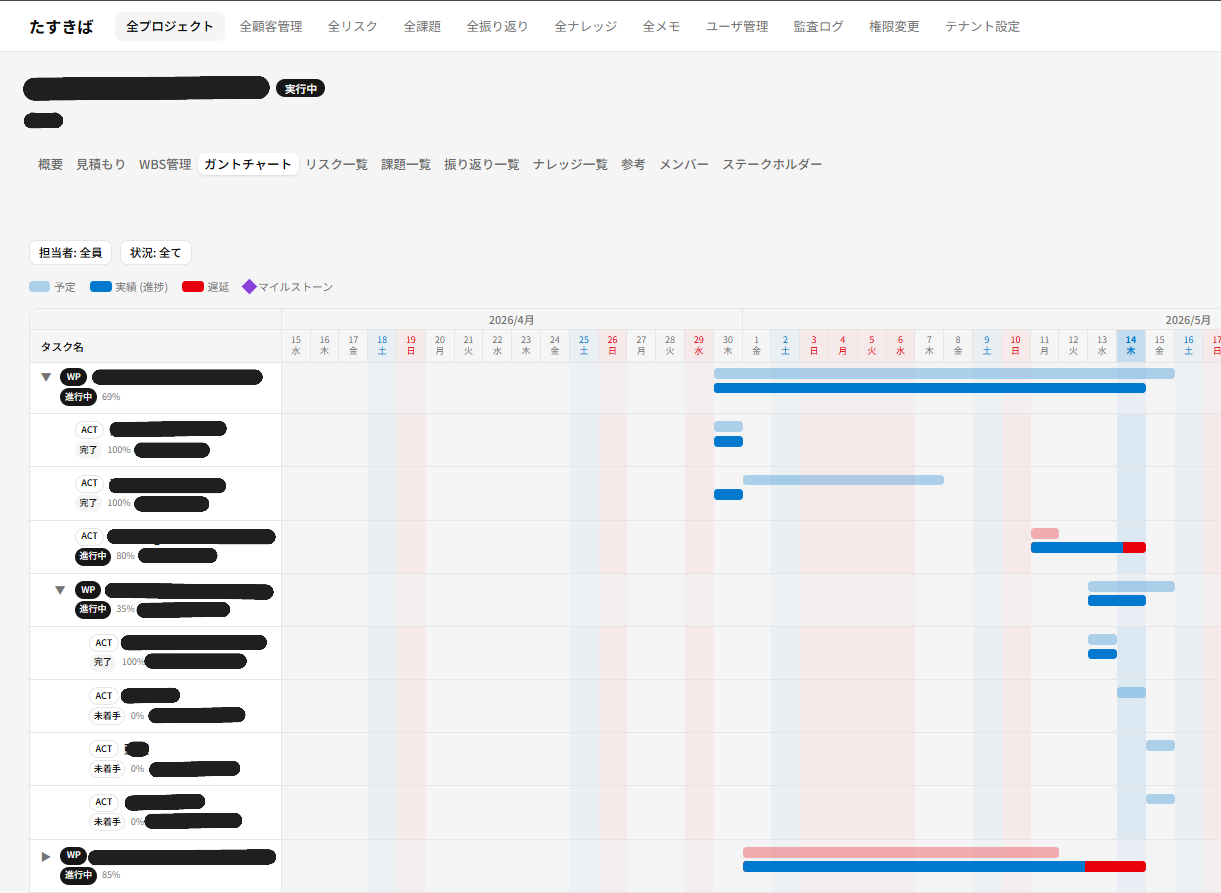
Gantt: light = plan, dark = actual, red = delay. Progress, delays, and milestones are obvious at a glance.
What the daily view becomes
Scene 1: Sunday night → Monday morning
Before: Sunday night, the firefighting case from the weekend keeps surfacing in your mind. Imagining tomorrow being eaten up by it instead of your real work makes you sigh.
After: Tasukiba has already surfaced retrospectives and countermeasures from similar past projects. You can close the weekend with “I’m ready for tomorrow,” and Monday morning you walk in energized.
The view shifts from “stuck firefighting” to “ready to face tomorrow.”
Scene 2: Meetings turn from search sessions back into decisions
Before: Mid-meeting, you try to pull up a past case. 200 results. Ten minutes of scrolling later, for every person in the room, that time was burned on “looking for material.”
After: When you need a past case mid-meeting, semantic search and proactive suggestions place the relevant few at the top. Within tens of seconds you have what you need, and the meeting goes back to being about decisions.
Meetings return from a “search session” to a “decision-making session.”
Scene 3: Your kindness gets backed by past experience
Before: During acceptance testing, more change requests come in. Out of kindness, you absorb them all. You and the developers work 12-hour days. Regressions hit. End-user satisfaction goes down despite everyone’s effort.
After: The moment a request comes in, Tasukiba surfaces similar past cases. “On this kind of late-stage scope addition, this project burned” is right in front of you. With objective evidence, you can say “we’ll handle this in the next phase.”
Your kindness is backed by past experience.
Pricing
Tasukiba uses a pricing model designed to keep running, not to maximize profit. No hidden fees, no upsell pressure — straightforward usage-based pricing.
| Beginner Start free | Expert Recommended | Pro Most capable | |
|---|---|---|---|
| Price | ¥0 | ¥10 / project create-or-update + ¥5 / Embedding business operation | ¥15 / project create-or-update + ¥15 / “Why?” AI explanation + ¥5 / Embedding business operation |
| Seats (invitable users) | up to 5 | unlimited | unlimited |
| Data capacity | 50 MB free, then ¥50/GB/month (per 1 GB tier) | same as left | same as left |
| Monthly project create/update | 50 / month (fixed cap) | unlimited | unlimited |
| Knowledge input & chat search | free up to 100 items / month | ¥5 / business operation | ¥5 / business operation |
| API call cap setting | — | Set a monthly budget cap in JPY | Set a monthly budget cap in JPY |
| LLM model | Haiku | Haiku | Sonnet (with rich explanations) |
| Trial | 90 days fully free | — | — |
| Best fit | Individuals and small teams who want to try | Individuals and teams in real operation | Users who prioritize the quality of judgment most |
What is a “seat”: The number of users you can invite to your tenant (your organization). Beginner allows up to 5 invitees; Expert / Pro have no limit.
Usage-based data capacity: 50 MB is fully free. Above that, ¥50 per 1 GB per month (e.g., 100 MB → ¥50, 1 GB → ¥50, 1.5 GB → ¥100). There is no cumulative cap — you are billed only for what you use, and your data is never blocked from being saved as it grows (a single write is limited to 5 MB).
★ Beginner “Knowledge input & chat search” ★: On the Beginner plan, creating/updating knowledge assets (knowledge / risks / issues / retrospectives / memos), chat-based semantic search, CSV import, and attachment indexing are free up to 100 items per month in total (the “90-day fully free” trial allowance). When the cap is reached, only new indexing pauses; viewing and searching existing data continues.
Expert / Pro Embedding charges: On Expert / Pro plans, knowledge asset input, chat search, and attachment indexing are ¥5 per business operation. CSV bulk import is aggregated as “1 import operation = ¥5” (e.g., a 100-row CSV import is still ¥5). The monthly automatic recovery of failed indexing stays free on all plans.
What gets charged: AI auto-tagging on project create/update (Beginner free up to 50/mo, Expert ¥10, Pro ¥15), the “Why?” feature (Pro-only ¥15), Embedding business operations (Beginner free up to 100/mo, Expert/Pro ¥5), data capacity overage (¥50/GB), and file storage overage (¥10/GB).
“Try it and decide for yourself whether it fits” — that’s our basic posture.
🛡️ Security features
For all users — individuals and companies alike — the following security features ship as standard.
| Feature | Summary |
|---|---|
| Tenant isolation | Fully separated data space per customer. Not visible to other tenants or to the operator |
| MFA (TOTP) | Compatible with Google Authenticator and other TOTP apps. Required for system administrators |
| Account lockout | 5 failed logins → temporary lock; 3rd cycle → permanent lock. MFA: 3 failures → 30-min lock |
| RBAC (role-based access control) | Four levels: system admin / PM-TL / member / viewer. Configurable per project |
| Audit log for all changes | All data changes, authentication events, and permission changes recorded and searchable by admins |
| Auto-deactivation of unused accounts | Automatic deactivation after 30 days of no login; physical deletion after 60 days |
| Confidentiality of error info | All errors are logged server-side; the UI shows only fixed messages to minimize information leakage |
| Automated security checks | Code with a security score below 90 cannot be merged, enforced in CI |
Vulnerability reports: If you find a vulnerability, please contact us via GitHub Security Advisory (preferred) or teppei09141998@gmail.com. We follow a Coordinated Disclosure policy (see the Security report section for the full reporting channels).
🔐 Security report
If you discover a security vulnerability in Tasukiba, please report it to one of the contacts below under our Coordinated Disclosure policy. The developer reviews every report personally and investigates the scope and remediation.
| Channel | Destination |
|---|---|
| GitHub Security Advisory (recommended) | Report a security vulnerability |
teppei09141998@gmail.com |
Reported vulnerabilities are handled confidentially until a fix is released. Where third parties may be affected, we may disclose the necessary details after remediation.
📦 What we offer when you adopt as a company
A summary of the items most frequently asked when evaluating Tasukiba for corporate use.
| Item | Current status |
|---|---|
| Contract form | Online sign-up + terms-of-service consent. If you need a separate contract (NDA / DPA / etc.), please reach out via Contact |
| Data residency | Data is stored in ap-northeast-1 (Tokyo region) |
| Cross-border transfer to AI services | When proactive suggestions and semantic search run, data is sent to Anthropic (US) / Voyage AI (US). Both are configured so your data is not used for training (see FAQ Q15) |
| Payment methods | Bank transfer (invoiced) and credit card payment (via Stripe) both supported |
| Qualified invoice (Japan’s invoice system) | The operator is not registered as a qualified invoice issuer, and does not plan to register. Please consider Japan’s transitional input-tax-credit measures or your company’s accounting policy |
| Uptime SLA | Operating with a single developer + Claude Code, so we do not publish an explicit SLA at this time. We prioritize data protection and continuity of operation |
| Data backup | Cloud DB automatic backups, and CSV export anytime from your tenant settings |
| Migration from existing tools | Direct integrations with Backlog / Notion etc. not yet available. CSV import of knowledge / risks / issues is supported |
| Cancellation / export | Done by you, without any back-and-forth with the operator, from the tenant settings screen |
How to contact us: For corporate adoption inquiries, please use the Contact form. Selecting “About Tasukiba” as the inquiry type ensures it lands as a Tasukiba-related question.
📃 Operator information
| Item | Details |
|---|---|
| Service name | Tasukiba (Tasukiba Knowledge Relay) |
| Operator | Teppei Suyama (operated as a sole proprietorship) |
| Contact | Contact form / teppei09141998@gmail.com |
| Terms of service | Japanese version (authoritative) — English translation not yet available |
| Privacy policy | Japanese version (authoritative) — English translation not yet available |
Statutory disclosure under Japan's Specified Commercial Transactions Act
| Item | Details |
|---|---|
| Seller | Teppei Suyama |
| Responsible operator | Teppei Suyama |
| Address | Disclosed promptly upon request |
| Phone number | Disclosed promptly upon request |
teppei09141998@gmail.com | |
| Pricing | See the “Pricing” section above |
| Additional fees | Communication costs (your internet connection fees, etc.) |
| Sales tax handling | Listed prices are tax-exclusive. Japanese consumption tax (JCT) is added separately at invoicing |
| Payment methods | Bank transfer (invoice-based) or credit card via Stripe (Visa / Mastercard / American Express / JCB). Switchable anytime in tenant settings. |
| Payment timing | Monthly billing cycle. · Bank transfer: due by the 25th of the following month. · Credit card: automatically charged within the first few business days of the following month. |
| Service delivery timing | Available immediately after sign-up completion |
| Returns and cancellation | Due to the nature of the service, refunds for periods already provided are not accepted. Cancellation can be done anytime from the tenant administrator screen and takes effect at the end of the current month (current month’s charges apply as usual) |
| System requirements | Latest versions of Chrome / Edge / Safari / Firefox |
Under Japanese consumer protection law, sole proprietors are permitted to use the “disclosed promptly upon request” format for personal address and phone number. These will be disclosed individually to anyone who inquires.
Community
Tasukiba is meant to be valuable not only as a tool but as “a third place” beyond home and work.
We’ve set up a Discord community as a place where developers, users, and the operator can chat as equals, regardless of role or seniority.
- “Here’s how I use it” / “Here’s how our team applies it” — case sharing
- “I’d love to have a feature like…” — feature requests directly to the operator
- Behind-the-scenes development thoughts and experiments
- Off-topic chatter welcome too
If the connections that form here go beyond projects and into private friendships, all the better.
Official social media
We also share the latest news, updates, and behind-the-scenes development notes on social media. We’d love it if you followed along.
We use Discord for two-way, flat conversation, and social media for release announcements, feature updates, and development progress. Feel free to follow from whichever platform you already use day-to-day.
FAQ
Click a category title to expand the questions inside. Then click each question to expand the answer.
🎁 Trial period and choosing a plan
Q1. What happens when the 90-day trial ends? Do I need to register a credit card?
No credit card registration is required at sign-up. The default payment method during and after the trial is invoiced bank transfer. Unless you upgrade to Expert / Pro, no charges occur.
After the trial ends, the tenant moves into read-only mode, and you can still view data and export. 90 days later (180 days total from tenant creation), data is automatically deleted, so please upgrade, export, or cancel before that.
If you decide to come back after deletion, you can only restart on the Expert / Pro plan (the Beginner plan cannot be restarted). See Q6 for details.
Q2. What's the difference between Expert and Pro?
There are three main differences.
| Difference | Expert | Pro |
|---|---|---|
| Per-project-update price | ¥10 | ¥15 (1.5×) + ¥15 for “Why?” |
| Underlying AI | Claude Haiku (light & fast) | Claude Sonnet (deep & smart) |
| “Why?” button | — | ✅ Pro-only (see Q3) |
Seat limits (unlimited) and monthly call limits (unlimited) are identical. Pro suits those who want a deeper AI and reason explanations; Expert suits those who want to use it heavily.
Q3. What is the Pro-only "Why?" button?
For each suggestion Tasukiba returns (“this looks related”), the “Why?” button asks the AI to explain in natural language why it was judged related.
- It summarizes “why this knowledge is similar to the current project,” using tags, purpose, scope, and historical context
- Useful for executive reports or external proposals where you need reasoning, not just relevance
- The explanation is generated by Pro’s Claude Sonnet
The Expert plan does not include the “Why?” button (the button itself is not shown on the UI). Suggestions themselves are available on both Expert and Pro, but the “explain the reason in words” experience is Pro-only.
Q4. When is a plan upgrade reflected?
Immediately. From the next API call after the upgrade, the new price and AI model apply.
Example: switching from Expert (Haiku, ¥10/call) to Pro (Sonnet, ¥15/call) → from the next operation onward, Sonnet runs and ¥15/call is counted.
If you switch mid-month, the month-end invoice shows a period-by-period breakdown (e.g., “Pro period ¥15 × 10 + Expert period ¥10 × 20 = ¥350”).
Q5. When is a plan downgrade reflected?
Also immediately. From the next operation after switching from Pro to Expert, Haiku (light & fast AI) and the ¥10/call rate apply.
Notes:
- The “Why?” feature is not available on Expert. The moment you downgrade from Pro to Expert, the “Why?” button disappears from the UI.
- Downgrading to Beginner is not possible. See Q6.
Q6. Is downgrading possible?
Expert ⇄ Pro switches are possible at any time. However, once you have selected Expert / Pro, you cannot revert to Beginner (the free plan).
This is a deliberate rule we set for the sake of operational sustainability. Whether you cancelled yourself, the trial expired and the tenant was deleted, or the system administrator deleted the tenant — in any case, restart is only possible on Expert / Pro. We do not re-provision a Beginner tenant.
Please think of Beginner as “for people trying Tasukiba for the first time only.” Export is always available, so we recommend backing up locally before cancelling (see Q17).
💳 Pricing and payment
Q7. What payment methods do you offer? Are you a qualified invoice issuer (Japan)?
We offer invoiced (bank transfer) and credit card as two options.
| Payment method | Availability | Detail |
|---|---|---|
| Invoiced (bank transfer) | ✅ Available | Monthly payment by bank transfer |
| Credit card | ✅ Available | Automatic monthly debit via Stripe (Visa / Mastercard / American Express / JCB). Switch from tenant settings. |
Organizational customers typically use invoiced payment, while individuals and lighter usage often prefer credit card. Both can be switched anytime from tenant settings (when switching from credit card to invoiced, the active subscription is canceled automatically and invoicing takes effect from the next month).
See Q8 below for the credit card details.
🧾 About qualified invoices (Japan)
The operator is not registered as a qualified invoice issuer at this time, and does not plan to register. For Japanese corporate customers using input tax credits, please rely on the transitional measures (80% credit through September 30, 2026 / 50% credit through September 30, 2029) or follow your company’s accounting policy.
🤔 Common follow-up questions
Does my company actually need to worry about this?
It depends on your accounting method.
| Method | Affected? | Why |
|---|---|---|
| Tax-exempt business (annual sales under ¥10M) | ❌ Not affected | No consumption tax filing in the first place |
| Simplified taxation | ❌ Not affected | Consumption tax is computed from sales only, not from input credits |
| Regular (full) taxation | ⚠️ Affected | Input tax credit is capped per the transitional measure (see next question) |
Mid-size and larger companies in Japan typically use regular taxation, in which case this matters.
For regular taxation, how much does it actually cost?
For a ¥10,000 transaction (¥1,000 consumption tax):
| Period | Creditable consumption tax | Effective cost | Increase |
|---|---|---|---|
| Through Sep 30, 2026 (80% transitional) | ¥800 | ¥10,200 | +¥200 |
| Oct 2026 ~ Sep 30, 2029 (50% transitional) | ¥500 | ¥10,500 | +¥500 |
| Oct 1, 2029 onward (end of transition) | ¥0 | ¥11,000 | +¥1,000 |
Impact is limited during the transitional period; the full 10% gap appears only after October 2029.
Can we negotiate the price?
Yes — please reach out via the contact form (inquiry type: “About Tasukiba”). We can discuss pricing that takes the future non-creditable portion (up to 10%) into account.
Note that, given our pricing structure aims at sustainability, significant discounts may not always be possible.
What if our internal policy forbids unregistered vendors?
Honestly: if your policy strictly requires a qualified invoice issuer, Tasukiba is hard to adopt as-is right now.
Possible alternatives:
- Adopt as personal purchasing — for sole proprietors / freelancers, the impact tends to be smaller
- Wait for a future change of stance — we may revisit our position as the operational phase changes
- Limited use during the transitional period — through September 2026 the 80% credit keeps the impact small
Please reach out via the contact form — we’d love to discuss your situation.
Q8. Can I pay by credit card? Which brands are supported and how do I switch?
✅ Yes, credit card payment is available. You can choose between bank transfer (invoice) and credit card, and switch at any time.
🌍 Supported card brands
| Brand | Supported |
|---|---|
| Visa | ✅ |
| Mastercard | ✅ |
| American Express | ✅ |
| JCB | ✅ |
Cards other than the four brands above (Diners Club / Discover / UnionPay) are not currently supported.
Payment processing is handled by Stripe with 3D Secure (cardholder authentication) supported. Card details are never stored on Tasukiba’s servers — they are managed exclusively within Stripe’s PCI DSS–compliant payment infrastructure, so it’s secure.
🔧 How to switch
- Sign in as a tenant administrator
- Open
Settings→Tenant settings→Billingtab - Under the “Billing information” form, change Payment method to “Credit card”
- Click “Update billing information” → you are automatically redirected to Stripe’s secure card-entry screen
- Enter your card details → from next month onward, charges are deducted automatically
💸 Charge timing
| Item | Schedule |
|---|---|
| Cutoff | End of the usage month |
| Automatic charge | Within the first few business days of the following month |
| Receipt | Automatically emailed by Stripe |
For credit-card payment, Tasukiba does not issue a PDF invoice — the Stripe receipt serves as your usage statement.
🔁 Switching back to bank transfer
Change the payment method back to “Bank transfer” and save — the active subscription is automatically canceled, and invoicing takes effect from the following month. The current month’s usage is consolidated into either a Stripe charge or a Tasukiba invoice (whichever flow is active at month-end), so no double-billing occurs.
🔒 If a charge fails
If a card has expired or there are insufficient funds, Stripe automatically retries up to 8 times over two weeks (Smart Retries). If all attempts fail, an email is sent to the registered Billing Contact, asking you to update the card. Continued failures are subject to the same 90-day grace policy described in Q10 (payment delays).
Q9. What is the billing cycle (cutoff, invoice issuance, payment due)?
For invoiced payment, we operate on the following schedule.
| Item | Schedule |
|---|---|
| Cutoff | End of usage month |
| Invoice issuance | By the 15th of the following month |
| Payment due | The 25th of the following month |
| Method | Bank transfer |
Example: May usage
- Cutoff: May 31
- Invoice issued: by June 15
- Payment due: June 25
The invoice PDF is sent to the Billing Contact Email registered in tenant settings.
If the 25th falls on a weekend or holiday, the deadline is extended to the next business day.
Applies to Expert / Pro plans. Beginner is free, so no invoice is issued.
Q10. What happens if payment is delayed?
Don’t worry. The service does not stop abruptly. We respond in stages based on elapsed days.
| Elapsed days | Restriction | Response |
|---|---|---|
| Due date ~ +30 days | None (normal operation) | Reminders at +3 / +14 days |
| +31 ~ +60 days | Switch to read-only mode | Dunning email + phone / account-manager outreach. 2 business days’ prior notice before switching |
| +60 ~ +90 days | Read-only maintained | If unreachable, content-certified mail (内容証明郵便) is prepared |
| +90 days / unreachable / bankruptcy | Tenant deletion notice → deleted 14 days later | Legal counsel consultation and procedures considered |
Capabilities retained during read-only mode:
- ✅ Login and view (projects, knowledge, issues, retrospectives)
- ✅ Data export (your data ownership is our highest priority)
- ❌ New writes / edits / deletes / API-generated suggestions
Once payment is confirmed, we lift the restriction immediately and writing resumes from that moment (no loss of past content).
🧾 About late-payment interest
We do not currently set late-payment interest, prioritizing trust with our users. We may set it later at the statutory commercial rate; we will notify in advance if so.
🔐 Data protection
- Even if it comes to tenant deletion, we always preserve a 14-day export window after the deletion notice (formally preserved even when communication is lost)
- After physical deletion, invoice PDFs / monthly API-call aggregates / payment-clearing records are retained for 5 years (based on retention obligations under Japan’s Commercial Code and tax law)
⚙️ How it behaves
Q11. What happens when the API call cap is exceeded?
Don’t worry. Tasukiba itself continues to work normally. Instead of “stop everything when the cap is hit,” we switch into a gentle “degraded mode” where only the AI behind the scenes pauses temporarily.
When does degraded mode start?
| Plan | Condition |
|---|---|
| Beginner | When the monthly project create/update count hits the fixed cap (50/month) |
| Expert / Pro | When the monthly charge hits the budget cap set by the tenant admin (does not trigger if unset) |
How is it lifted?
- Automatic: On the 1st of the next month (JST 09:00), counters reset to 0 and normal mode resumes automatically
- Manual (instant): Beginner can upgrade to Expert / Pro; Expert / Pro can raise the budget cap. Either lifts it instantly.
See Q11 for behavior during degraded mode.
Q12. What does and doesn't work in degraded mode?
In one line: It’s like an “energy-saving mode” where the AI takes a break, but normal work continues.
Think of it as similar to your phone switching to low-power mode when the battery is low. Because AI calls have a cost, when the cap is reached we pause only AI features while letting normal work continue, so the bill never blows past expectations.
✅ Still works (as usual)
- Writing: create / edit / delete projects, knowledge, risks, issues, retrospectives, memos
- Reading & searching: view and search past data
- CSV / Excel import: bring data in from files
- Recommendations: related-project suggestions continue (with slightly reduced precision; see below)
- Plan changes / cancellation / cap changes: always allowed (these are how you end the pause)
⏸️ Paused (the AI parts only)
- AI semantic understanding for new content: AI analysis of newly written memos / knowledge pauses (data created during degraded mode is saved without AI understanding)
- Auto-tagging: AI tag suggestion pauses (manual tagging still works)
- “Why?” button explanation generation (Pro only): Already-generated explanations remain viewable from cache; only new generation pauses
🎨 How does it look on screen?
- A yellow banner appears at the top of the screen so the mode is obvious at a glance
- Admins see an extra “Open settings” button for instant recovery via plan change or cap raise
- Regular users see “Please consult your administrator”
📊 What does “slightly reduced recommendation precision” mean?
The recommendation feature usually computes similarity on three axes:
Normal:    tag match 30% + text content 20% + AI semantic understanding 50%
Degraded:  tag match 50% + text content 50% + AI semantic understanding 0%
Memos created in degraded mode are stored without AI analysis, so recommendations rely on tag + text content alone. Connections like “the tags and text differ, but the meaning is close” become harder to find — but on the monthly reset (1st of each month, JST 09:00), missing AI analyses are backfilled in bulk, restoring full precision. (Up to 128 items per run; overflow carries into the following month.)
🔄 When does it lift?
- Automatic: monthly reset on the 1st (JST 09:00) returns you to normal mode
- If you want it back immediately (admin):
- Beginner → upgrade to Expert / Pro
- Expert / Pro → raise the monthly budget cap
Note: “Expert / Pro → Beginner” is not possible (see Q6).
One-liner: To prevent overspending, the AI takes a break — but normal work doesn’t stop. It automatically lifts next month, or instantly if the admin changes the plan or cap.
Q13. Is cancellation complex?
No. Cancellation completes in a few clicks from the tenant settings screen. No phone calls, no meetings, no back-and-forth with the operator. “Welcome those who come, and don’t block those who leave” is our policy.
🔐 Data safety
Q14. How is the data I enter protected?
It’s stored in a state of complete isolation per tenant. The design does not allow any view from another tenant. In addition, all data changes, authentication events, and permission changes are automatically recorded as an audit log.
See the “🛡️ Security features” section above for a full list (MFA, account lockout, auto-deactivation of unused accounts, and more — available to individuals and companies alike).
Q15. Is my data used to train AI? Does it leave the country?
Short answer: It is not used for training. But during proactive suggestions and semantic search, data is sent to overseas AI services (US).
Here are the details.
📍 Where data is stored
The main database is in ap-northeast-1 (Tokyo region). The knowledge, risks, issues, and retrospectives you enter are all stored in Japan.
🌐 When cross-border transfer happens
When proactive suggestions or semantic search run, data is sent to the following overseas AI services.
| Service | Location | Use |
|---|---|---|
| Anthropic (Claude) | US | Suggestion explanations, auto tag extraction (Haiku / Sonnet) |
| Voyage AI | US | Convert text to numerical vectors (for semantic search) |
🚫 Why it isn’t used for training (three parties)
① Tasukiba itself
- We never reuse your input for cross-tenant training or for building derived AI models
- The database is fully partitioned per tenant — only Company A’s people see Company A’s data
② Anthropic (Claude)
- Anthropic’s Commercial Terms of Service prohibit using customer data to train AI models
- “Not used for training” is guaranteed at the contract level
③ Voyage AI (text → vector for semantic search)
- Voyage AI’s default terms allow using data for training
- However, the Tasukiba operator has set the “do not use for training” opt-out, so data sent to Voyage AI is not used for training either
📊 Summary
| Who? | Uses your data for training? | Reason |
|---|---|---|
| Tasukiba itself | ❌ No | Explicit terms + tenant isolation |
| Anthropic (Claude) | ❌ No | Prohibited under enterprise terms |
| Voyage AI | ❌ No | Operator has opted out |
| Other AI vendors | — | Data isn’t sent at all |
🚨 Honest note: nobody can say “absolutely”
Theoretically, every service in the world carries some residual risk — AI-vendor hacks, future terms-of-service changes by AI vendors, account takeover via impersonation.
Tasukiba builds in measures to make those risks as small as possible:
- API keys are kept securely; never written into code or records
- Triple over-use blocking prevents abuse via mass-call flooding
- Tenant isolation is the top priority (treated as a hard fail if breached)
- Checks for other people’s personal information leaking into AI responses
- Automated checks that block merges of code with security scores below 90
📋 Each AI vendor’s official policies
If you want to verify yourself, or if your enterprise partners ask for the AI vendor’s terms (as of May 2026):
- Anthropic (Claude): anthropic.com — Commercial Terms of Service (explicitly excludes training) / Privacy Policy / FAQ “Is my data used to train your models?”
- Voyage AI: voyageai.com — Terms of Service (describes the opt-out) / Privacy Policy
🚪 Service longevity and data portability
Q16. Could the service shut down? What's the uptime target?
Honestly: we’re currently operated by a single developer + Claude Code (AI), a small team. If we don’t reach monetization within two years of launch, we’ll stop onboarding new users, but the service itself is expected to continue because the developer uses it daily. If we ever have to stop providing the service, we will always set aside time for you to export your data first.
📊 About uptime and incident response
Given the small-team nature, we do not publish an explicit SLA (uptime guarantee) at this time. We’d rather be honest than commit to numbers we cannot back up.
That said, our operating principles are:
- Data protection is the top priority (automatic cloud DB backups + user-initiated export anytime)
- For serious incidents, we share the cause and recovery estimate on the Discord community
- Once we are operating at scale, we will formally set up SLAs and incident-response contacts
🤝 The developer is also a user
Tasukiba is a platform the developer uses daily for project operations. The fact that “the maker would suffer first if it went down” means the structural risk of abandonment or sudden shutdown is low.
Q17. Can I migrate data from existing tools?
Export is always possible. Regardless of plan limits, post-cancellation, or post-trial, you can download a full export from your tenant settings. We don’t yet have direct integrations with Backlog / Notion etc., but CSV import is partially supported for knowledge, risks, and issues — Excel and spreadsheet imports are fine.
🦉 About Tasukiba
Is Tasukiba free to use?
Yes. The Beginner plan is free, and even after the 90-day trial, read access to your records continues. Asset entry and chat are free for up to 100 uses per month. No credit card is required.
What is semantic search?
Rather than exact keyword matching, it ranks past assets by “closeness of meaning.” For example, typing “はし” (hashi) distinguishes between chopsticks, bridge, and edge based on context — so you reach the truly relevant asset even across variations in wording.
What is the Tasukiba Owl?
It’s an AI chatbot that’s always available in the bottom-right corner of the screen. Just ask in natural language, like “I want past assets from a situation like this,” and it searches semantically across projects, knowledge, risks, issues, retrospectives, memos, and attachments, then suggests results conversationally.
Is the security robust enough for enterprise use?
We support MFA (multi-factor authentication), RBAC permission management, audit logs for all data changes and authentication events, and tenant isolation. It’s designed with defense in depth, built for enterprise adoption.
What is the "Why?" feature?
A Pro plan feature where AI (Claude) explains why a suggested past asset is relevant to you right now. Instead of accepting suggestions at face value, you can check the reasoning before deciding.
Who is this tool for?
It’s best suited for project managers, team leads, and others who manage organizations or projects. It’s a great fit for teams that want to reliably pass on past knowledge to the next person in charge.
Give it a try
90 days free. Cancel anytime. Whether it fits is, in the end, something best judged by you.
(This service has ended. Sign-up is no longer available; the section above reflects the product as it was while live.)
After 90 days
After 90 days of consistent use, your projects look like this:
- Kickoffs become discussions, not “go back and read past cases” sessions
- Improvements raised in retrospectives automatically resurface at the start of your next project
- Handover costs around transfers and departures shrink, supported by structured knowledge
— When that cycle starts to turn, Tasukiba stops being “a tool” and becomes your team’s memory.
Anything we didn't cover here?
Thank you for reading this far.
If there’s anything left — “I’d like to know more,” “this part still bothers me,” “we’re evaluating corporate adoption” — please reach out via the Contact form.
Corporate adoption inquiries / NDA & DPA discussions / security checklist requests — all welcome through the same form.
On the contact form, please select “About Tasukiba” as the inquiry type. We’ll treat it as a Tasukiba-specific question and the developer reads it directly.
The developer reads every message personally. No sales pressure, no aggressive follow-up.
🗓️ Release History
| Version | Release date |
|---|---|
| v1.5.0 | 2026-07-03 |
| v1.4.0 | 2026-06-26 |
| v1.3.0 | 2026-06-19 |
| v1.2.0 | 2026-06-12 |
| v1.1.0 | 2026-06-05 |
| v1.0.0 | 2026-06-01 (official launch) |
Planning a monthly release cadence going forward.